Showing posts with label Gag Meme Damnlol. Show all posts

Damn LOL Blogger Template

Damn LOL Blogger Template


Template Name: Damn LOL
Platform: Blogger / Blogspot
Release Date: December 25, 2012
Author: Templateism

TEMPLATE FEATURES

Damn LOL Blogger Template is perfect for pictorial related blogs and websites. It has a dark color scheme which looks dazzling with images. Damn LOL is one of the most prominent Troll Related website that shares Trolling pictures, Funny images and etc. This theme exactly looks a like Damn LOL. Furthermore, This Theme has all those features which are vital to run a picture based site. We are sure after applying it on your BlogSpot site you would never turn back to your old template.

Features of Damn LOL Blogger Theme:

  1. Adapted From WordPress: The Elements used in this theme are adapted from WordPress, so it should provide a professional look to your site. However, dynamically it is would only work on Blogger Platform.
  2. Excellent Page Speed: Since, there is no modern Jquery or JavaScript included on this theme. Therefore, it has 94 Google Page Speed score which is ideal for Search engines.
  3. Google AdSense (Ads) Ready: It has multiple areas where we can easily place advertisements of different sizes. For Example, a 728x90 Ad Slot beside Logo and etc.
  4. Floating Older/Newer Post Buttons: It also has floating Older/Newer Post buttons that allow users to navigate pages quickly. It also helps in reducing the bounce rate because a user spends a lot time in navigating different pages.
  5. SEO Friendly: Though, this theme is no for TEXT based (Content) website but still we have optimized it for Search engine. Now it’s up to a person whether he should Add Alt Tags to his Images.
More Features: 1 Sidebar, Footer, Fixed Width, Dark whitish background, threaded commenting system.

Important Instructions:

Set One Post on Home Page: To Increase your page views rapidly, we would suggest everyone to display one post on the main page i.e. Homepage. Go To Blogger >> Settings >> Post and Comments >> and Select 1 Post to be displayed on Homepage.


Displaying Google Adsense Below & Above Posts: To display Google AdSense or any other advertisement below or above the posts look for the following Coding and replace <!--Google Adsense Ad Code (Below Post Title)-->  or <!--Google Adsense Ad Code (At the End of Posts)--> with your parsed Google Ad code.

To Show Below Post Title:

<b:if cond='data:blog.pageType == &quot;item&quot;'> 
<!--Google Adsense Ad Code (Below Post Title)--> 
</b:if>

To Show at The end of Posts:

<b:if cond='data:blog.pageType == &quot;item&quot;'>
<!--Google Adsense Ad Code (At the End of Posts)-->
</b:if>


EXTRA SEARCH TAGS (IGNORE!)
blogger templates cloud, blog templates cloud, templates cloud, free premium blogger templates, free quality blogger templates, freemium, download free blogger templates, best blogger templates, top blogger templates, template blog, blogger templates, templates for blogger, templates-blogger, templates for blog, blogspot templates, blog templates, templates for blog, templates para blogspot, blog templates for blogspot, web design, webdesign, website templates, xml, themes, designs, free templates, layouts, tube blogger templates, youtube clone blogger templates, free video blog templates, gag blogger templates, damnlol blogger templates, funny blog templates, responsive blogger templates, blogger template lists, online store blogger templates, shopping cart blogger templates, eCommerce blogger templates, ads ready blog templates, auto slider ready blogger templates, download free blogger templates. 
0

Blogger's Gag Blogger Template

Blogger's Gag Blogger Template


Template Name: Blogger's Gag
Platform: Blogger / Blogspot
Release Date: February 2, 2014
Author: Joneix

TEMPLATE FEATURES

Blogger's Gag is a responsive blogger template made in style like gags web portal, powered with masonry for better look in any devices. Which automatically load youtube thumbs. Create a Viral Blog using Blogger's Gag.

Features of Blogger's Gag Blogger Template:

Masonry Style
Blogger's Gag is a best looking template in any devices by automatically adjust width of containers.

Cross Browser Support:
Blogger's Gag supports all major browsers and devices

Fully Responsive:
Blogger's Gag is fully responsive and gives best view in any devices

Automated Thumbnail Generator:
Blogger's Gag automatically generate thumbs.

Multi-Color option:
Fully customizable with colours from panel .

Great look With Friendly Layout:
Blogger's Gag has a friendly layout area you can easily add or remove widgets.

Fast Loading:
Our all templates are clean coded and well organized for understanding and as fast loading speed.


1. Create Post

This themes handles content in a standard Blogger way. Each individual blog post represent a single grid module. The theme required to have at least an image each post in order to create thumbnail.

NOTE: This template Generates Thumbs only for Youtube. ( for Vimeo, dailymotion, metacafe videos Manually add Thumb)

To add youtube Video simple click the HTML button that appear at the top of WYSIWYG Editor
and add the embed code of your video.

<iframe allowfullscreen="" frameborder="0" height="315" src="http://www.youtube.com/embed/tSoy92vBX" width="560">

To add image simple click the Insert Image button that appear at the top of WYSIWYG editor and they'll be uploaded to Bloggers's server space called Picasa, so you don't have to host the pictures on a different website.

2. Navigation Menus

This template comes with only one navigation menus area. You can simply throw gadget beside header, no matter if it's a categories gadget or page gadget, that will be implemented as unordered list.

You can add stand alone or external page such as facebook, twitter, etc within Page widget called +Links. To add new page, from your dashboard go to "Pages" tab.

3. Template Designer

Blogger's new template designer allows you to create the perfect look for your blog. It's easy and free. You can edit some parts such as: Font-family, template background, Font color, etc — through template designer. This is a starting place for lots of magic to happen.

From your Dashboard navigate to Template → Customize.

4. Custom Page Not Found (404)

You can change Blogspot default error message to something else from the Blogger Settings. The option is there at Settings → Search preferences → Custom Page not Found
02

You have to fill up this text area with following HTML Code.

<div class="error-custom">

404 Not Found

We're sorry but we could not find the page you are looking for.

This may happen if you have entered site url incorrectly or this page doesn't exist anymore.


You can try searching page again or go back to home


<form id="searchform" action="/search" method="get">
<input id="s" name="q" value="Search..." type="text"/>
<input id="searchsubmit" value="Go" type="submit"/>
</form>

</div>

5. Additional Widget / Script

In addition to default Blogger features, I'm going to recommend some widget. You need to know that following widgets are optional and I can't offer any warranties for each of them as they are all created by outside parties.

Flickr

You can throw it in HTML/Javascript gadget text area. Just copy and paste following code in the space.
Visit this site to get your FLickr ID. http://idgettr.com/

Search Form

Drop HTML/Javascript gadget besides header then fill the form with following code:

<form id="searchform" action="/search" method="get">
<input id="s" name="q" value="Search Here" type="text"/>
<input id="searchsubmit" value="Go" type="submit"/>
</form>

6. Custom CSS

The Blogger Template Designer allows you to insert custom CSS code to change your blog's appearance. You can access the advanced settings of the Template Designer to change all design elements of your blog. You can safely tweak your blog's design by using custom CSS code, as it will not alter your blog's core HTML design. Make any necessary changes to your blog's CSS code in the future from the same location in the Blogger Template Designer.

This template comes with custom css where you can simply copy the source and paste directly in available text are of Template designer → Advanced → Custom CSS

7. For Post Views

To install the Dynamic Post Views Counter, first thing you need to do is to CREATE FIREBASE account.

1. Go to www.firebase.com Homepage.

2. Click SIGNUP and fill in all the information step by step.

3. In Step-2, it will ask you to create a FIREBASE DATABASE.

4. Enter the name of your FIREBASE DATABASE in the box (I have entered "Bloggersgag") & Click CREATE button.

5. This will generate the URL like:

bloggersgag.firebaseIO.com

Find and Replace it with your database in the template.
0

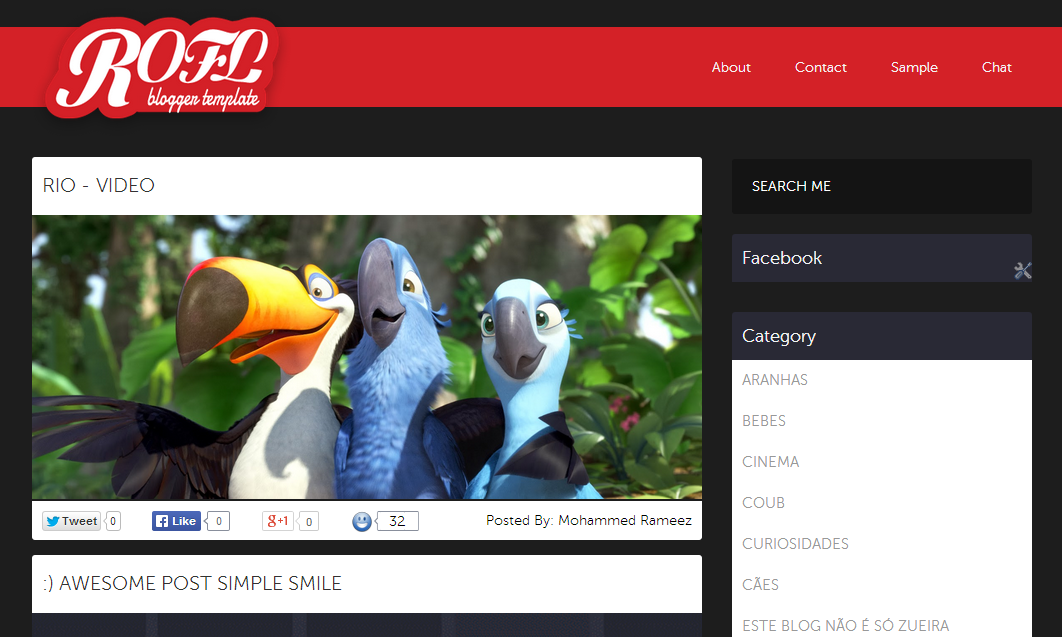
ROFL Responsive Meme Blogger Template

ROFL Responsive Meme Blogger Template


Template Name: ROFL Responsive Meme
Platform: Blogger / Blogspot
Release Date: January 25, 2014
Author: Blogger Panda

TEMPLATE FEATURES

ROFL is a meme based blogger template build for entertainment blogs. This blogger template will work like a wordpress hosted blog on your blogger. this template is has similar functionally of memecentercom, bobagento.com, naointendo.com.br, eumenti.com

ROFL Meme Blogger Template is perfect for picture sharing sites, meme sites, troll images, video sharing sites, You can say this template is made for entertainment sites. This has awesome colors scheme perfected for entertainment blogs.

Design Features
  • SEO optimized
  • Auto load posts on scroll
  • Posts view counter
  • Facebook comment system integrated
  • Customized label section
  • Customized popular posts
  • Flat design
  • Cross browser support
  • Adsense Ready
  • Ads Ready
  • Template Structure

Responsive design 
  • Two column homepage 
  • Two column post page 
  • One widget sidebar
  • Top custom menu


EXTRA SEARCH TAGS (IGNORE!)
blogger templates cloud, blog templates cloud, templates cloud, free premium blogger templates, free quality blogger templates, freemium, download free blogger templates, best blogger templates, top blogger templates, template blog, blogger templates, templates for blogger, templates-blogger, templates for blog, blogspot templates, blog templates, templates for blog, templates para blogspot, blog templates for blogspot, web design, webdesign, website templates, xml, themes, designs, free templates, layouts, tube blogger templates, youtube clone blogger templates, free video blog templates, gag blogger templates, damnlol blogger templates, funny blog templates, responsive blogger templates, blogger template lists, online store blogger templates, shopping cart blogger templates, ecommerce blogger templates, ads ready blog templates, auto slider ready blogger templates, download free blogger templates.
0

9Gag Clone Blogger Template

9Gag Clone Blogger Template


Template Name: 9Gag Clone
Platform: Blogger / Blogspot
Release Date: October 29, 2012
Author: Mohamed Rias

TEMPLATE FEATURES

Yo Fellas! Hope you are having a great time.I have been busy with server migration and web design works lately. At last i have got some time to write a quick post. In this post, I am looking to distribute my another Blogger template called “9Gag Clone”. Yes, as the name suggests its a 9gag.com clone. I have tried to rip all the cool features of 9gag. Still I don’t think many would be thinking to have that sort of a site on blogger. However, Of course you can do so but still blogger isn’t so powerful still. I probably guess, it will get all those CMS features very sooner. Let’s see the template features and tips to customize the template work for you.

FEATURES OF 9GAG BLOGGER THEME
3 different Header stylesAutomatic Featured PostsAutomatic Featured PostsWidget ready sidebarsAutomatic thumbnail creatorRead More hackPage Navigation WidgetSubscription boxFavicon IncludedComment form enabledAuthor comments new styleGravatar ready – AuthorAdvertisement Ready

HEADER STYLE
This template has got three different header styles. In the home page, you can have the featured posts listed with thumbnails. And in the post pages, you can either show up a list of category links or you can even show Adsense or any other network ad below the title.


I will distribute all three versions of it. You can download anyone which suits you.

RELATED POSTS WITH AD
We have implemented a better way to display the related posts widget along with ad. To insert your Ad code, Go to EDIT HTML page of your template and click “Expand widgets” check box.

Then search for the following code :

<img style="background: none; border: none;" src="http://smashingtips.com/wp-content/uploads/2012/06/300x300.gif" alt="" />

Replace this code with either encoded adsense code or Banner image.

POST TITLE WITH SOCIAL MEDIA ICONS

POST THUMBNAIL SIZE MANAGEMENT

By default, I have set the image size used in 9gag site. But if you want to use this template for a tech blog and want to customize the image size width. Then you can do that by editing the following code in your template.


Go to EDIT HTML page of the template. And look for the following code.

<script type="text/javascript">// <![CDATA[

var thumbnail_mode = &quot;float&quot;;
 summary_noimg = 500;
summary_img = 250;
img_thumb_height = 340;
img_thumb_width =460;
// ]]></script>
<script type="text/javascript" src="http://smashingtips.com/blogger/readmore.js">// <![CDATA[

There you can find the image width and height parameters img_thumb_height = 340; and img_thumb_width =460; . Change the width and height to suit your template.

WIDGETIZED SIDEBAR
I have made widgets to show recent posts with thumbnail and without thumbnail, Posts from any particular category with/without thumbnail, two columns category list and Scrolling followers box.

To include the widgets in your template, Please follow the steps mentioned here.

Let us take a look at the code for showing recent posts :

<script style='text/javascript' src='http://smashingtips.com/blogger/recent.js'>
// ]]></script><script type="text/javascript">// <![CDATA[
var numposts = 5;
var showpostthumbnails = true;
var displayseparator = true;
var showcommentnum = true;
var showpostdate = true;
// ]]></script>
<script type="text/javascript" src="http://domain.blogspot.com/feeds/posts/default?orderby=published&alt=json-in-script&callback=recent"></script>

In this change , domain name to your blog domain name.

<script type="text/javascript" src="http://smashingtips.com/feeds/posts/default?orderby=published&alt=json-in-script&callback=recent"></script>

For showing posts from particular category :

Change the last line in the code to this.

<script type="text/javascript" src="http://domain.blogspot.com/feeds/posts/default/-/featured?orderby=published&alt=json-in-script&callback=recent"></script>

Here change the domain name and “featured” to the label name


EXTRA SEARCH TAGS (IGNORE!)
blogger templates cloud, blog templates cloud, templates cloud, free premium blogger templates, free quality blogger templates, freemium, download free blogger templates, best blogger templates, top blogger templates, template blog, blogger templates, templates for blogger, templates-blogger, templates for blog, blogspot templates, blog templates, templates for blog, templates para blogspot, blog templates for blogspot, web design, webdesign, website templates, xml, themes, designs, free templates, layouts, tube blogger templates, youtube clone blogger templates, free video blog templates, gag blogger templates, damnlol blogger templates, funny blog templates, responsive blogger templates, blogger template lists, online store blogger templates, shopping cart blogger templates, ecommerce blogger templates, ads ready blog templates, auto slider ready blogger templates, download free blogger templates.
0

MeGusta [9Gag Clone] Blogger Template

MeGusta [9Gag Clone] Blogger Template


Template Name: MeGusta [9Gag Clone]
Platform: Blogger / Blogspot
Release Date: November 9, 2013
Author: ThemeTomb

TEMPLATE FEATURES

MeGusta is perfect gallery blogger template for funny pictures and gag related blogs. It has perfect combination of black and white color. Megusta template is inspired from 9gag website that is famous for publishing trolling images, memes and videos. We have tried to rip all cool features of 9gag. If you are planning to start a meme pictures blog or already running a blog then don’t waste your money on hosting and other expenses. This is an ideal template for Meme base websites that have all the features a gag website need.

Main Features Of Megusta 9gag Blogger Template
 It increases your pages, social sharing, bounce rate and most important revenue.

Professional Layout

Template looks very professional. No one can easily tell the difference that you are using free blogger platform or premium WordPress blog

Theme Loading Speed

Theme has excellent page loading speed. On Google developers page speed test tool it score 92 out of 100 which is extremely good.

SEO Friendly

 As page speed is also a factor in search engine optimization aside of template loading speed. All important HTML tags are carefully used. We tried to make it as search friendly as we can. This template is not for text base websites or blogs so you should have to add Alt tag and title tag into images manually to make it more seo friendly

Social Sharing

We have sticky social sharing buttons of three popular social websites. Facebook, twitter and google+
If visitor scroll down Facebook, twitter and Google+ buttons will float automatically and will not lag behind.

Sticky Sidebar (Optional)

Template has two side bar one is static and other has sticky feature enabled. You can place any widget or advertising banner there. You widget or ads will stick to the screen

Advertisement Ready

You can easily display ads of Google AdSense or any other advertising network. Just place their code inside the HTML editor. You can also make your ads to stick to screen


EXTRA SEARCH TAGS (IGNORE!)
blogger templates cloud, blog templates cloud, templates cloud, free premium blogger templates, free quality blogger templates, freemium, download free blogger templates, best blogger templates, top blogger templates, template blog, blogger templates, templates for blogger, templates-blogger, templates for blog, blogspot templates, blog templates, templates for blog, templates para blogspot, blog templates for blogspot, web design, webdesign, website templates, xml, themes, designs, free templates, layouts, tube blogger templates, youtube clone blogger templates, free video blog templates, gag blogger templates, damnlol blogger templates, funny blog templates, responsive blogger templates, blogger template lists, online store blogger templates, shopping cart blogger templates, ecommerce blogger templates, ads ready blog templates, auto slider ready blogger templates, download free blogger templates.
0

LOLSeen Funny [Clone Of Damn LOL] Blogger Template

LOLSeen Funny [Clone Of Damn LOL] Blogger Template


Template Name: LOLSeen Funny [Clone Of Damn LOL]
Platform: Blogger / Blogspot
Release Date: December 5, 2013
Author: Techfurk
Designer: Kelum Isuranga

TEMPLATE FEATURES

This template can be usable for funny picture , stories, videos sharing site. Please use one image/video/sory for one post. and set main page post limit to one or two. see how to do it. You can use two of arrows to view more posts (like damnlol). The left side widget showing recent funny things some of. Template it 2 column and well coded. You can put widgets anywhere. To change navigation bar links. go to pages and add them. Also all posts containing Facebook like button when someone liked. your post will share on facebook.


EXTRA SEARCH TAGS (IGNORE!)
blogger templates cloud, blog templates cloud, templates cloud, free premium blogger templates, free quality blogger templates, freemium, download free blogger templates, best blogger templates, top blogger templates, template blog, blogger templates, templates for blogger, templates-blogger, templates for blog, blogspot templates, blog templates, templates for blog, templates para blogspot, blog templates for blogspot, web design, webdesign, website templates, xml, themes, designs, free templates, layouts, tube blogger templates, youtube clone blogger templates, free video blog templates, gag blogger templates, damnlol blogger templates, funny blog templates, responsive blogger templates, blogger template lists, online store blogger templates, shopping cart blogger templates, ecommerce blogger templates, ads ready blog templates, auto slider ready blogger templates, download free blogger templates.
0
 
Your #1 Source of Free Premium Quality Blogger Templates
Copyright © 2014. Blogger Templates Cloud - All Rights Reserved

Powered by Spykepug Network
